Tort Notice — Uncollected Goods Notice to Collect or Sell (Word & PDF Template)
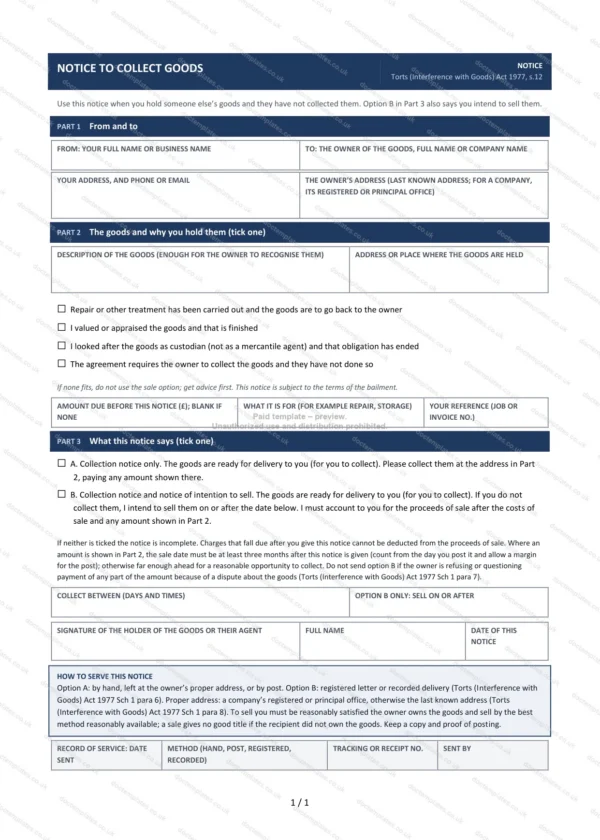
A single-page notice letting the owner know their uncollected goods are ready to collect. It can also state that you intend to sell them. It works under the Torts (Interference with Goods) Act 1977.
Compatible with:
Drafted for England & Wales and checked against current UK legislation. Last reviewed November 2026. How we check


Your card details go straight to Stripe, our payment processor. They are never stored on this site. Checkout takes a minute and needs no account.
Has a repair, valuation or storage job left goods unclaimed? Under the Torts (Interference with Goods) Act 1977, this one-page notice tells the owner their goods are ready to collect. With option B, it also states that you intend to sell them if they remain uncollected. The notice fits on one A4 page.
Who is this notice for?
Repairers, workshops, storage providers, valuers and anyone else holding goods for someone else when those goods have not been collected after the work is finished or the agreement has ended.
What does the notice include?
- From and to: your details and the owner’s proper address.
- The goods: what they are, where they are held, why you hold them (repair, valuation, custody, or a duty to collect under the agreement) and any amount owed.
- What the notice says: option A covers collection only. Option B covers collection and gives notice of intention to sell on or after a stated date, and explains how the proceeds are accounted for.
- Timing and proceeds: the minimum time before a sale where money is owed, what may be deducted from the proceeds, and when option B must not be sent.
- Service: how to serve it (registered letter or recorded delivery for option B), with a record of service and proof of posting.
Scope
Do not send option B if the owner refuses or questions any part of the amount because of a dispute about the goods. If the person notified did not own the goods, a sale gives the buyer no proper title.
Format
Download instantly as an editable Word (.docx) file and a PDF, formatted to A4. It opens in Microsoft Word, Google Docs and LibreOffice. In Word and LibreOffice you can tick the boxes with a click; on paper, tick them by hand.
How to edit the template
- Download the DOCX file after purchase
- Open it in Word, Google Docs, LibreOffice or another DOCX editor
- Fill in the parties' details in the marked fields
- Edit the terms and text to match what has been agreed
- Print it for signing or send it digitally