 1 /
5
1 /
5
Prenuptial Agreement — Word & PDF Template
Prenuptial agreement for couples marrying, recording financial disclosure, ringfencing of pre-marital assets, the matrimonial home and provision on breakdown.
incl. VAT
Compatible with:
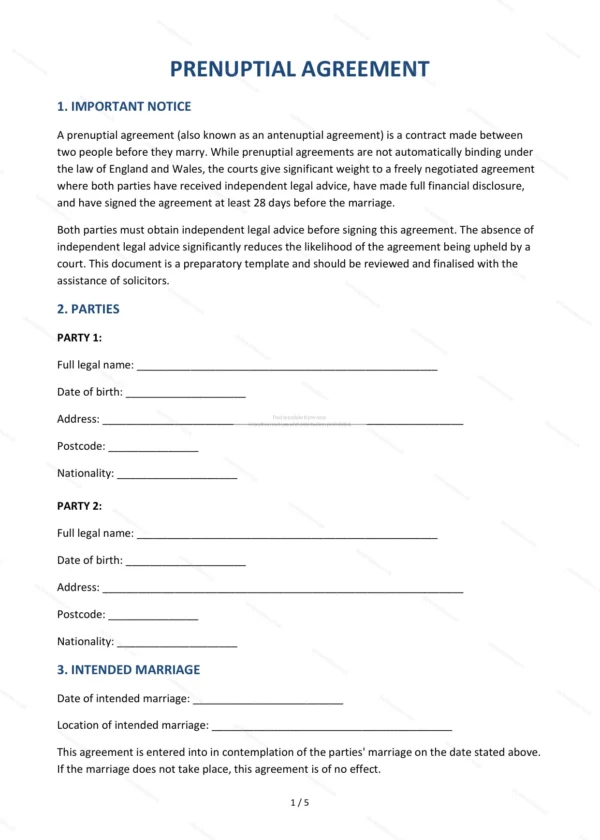
This Prenuptial Agreement allows a couple intending to marry to record how their finances and assets should be treated, both during the marriage and if it breaks down. It is prepared for use in England and Wales and reflects the disclosure and independent-advice steps that help such agreements carry weight.
Who is this template for?
For couples planning to marry who wish to protect pre-marital or inherited assets, clarify financial expectations and reduce uncertainty — for example where one party owns a business, property or has children from a previous relationship.
What does the template include?
The agreement is organised into clearly numbered sections:
- Important Notice — the status of prenups and the need for legal advice.
- Parties — the intended spouses.
- Intended Marriage — details of the planned marriage.
- Financial Disclosure — each party’s assets and income.
- Pre-Marital Assets (Ringfencing) — protecting existing assets.
- Inherited and Gifted Assets — treatment of inheritances and gifts.
- Matrimonial Home — how the family home is dealt with.
- Financial Provision on Breakdown — division if the marriage ends.
- Maintenance — spousal maintenance arrangements.
- Review Clause — reviewing the agreement over time.
- Children — acknowledgement of children’s needs.
- Independent Legal Advice — confirmation each party took advice.
- Governing Law — England & Wales jurisdiction.
- Signatures — execution by the parties.
Easy to customise
The template works in Microsoft Word, Google Docs and LibreOffice. Fill in the highlighted fields, complete the financial disclosure and adjust the clauses; both parties should take independent legal advice before signing.
Format and scope
Provided as an editable Word (.docx) file and a ready-to-print PDF in A4 size, drafted for use in England and Wales.
How to edit the template
- Download the DOCX file after purchase
- Open it in Word, Google Docs, LibreOffice or another DOCX editor
- Fill in the parties' details in the marked fields
- Edit the terms and text to match what has been agreed
- Print it for signing or send it digitally