 1 /
4
1 /
4
Deed of Gift — Word & PDF Template
A deed of gift to transfer money or property to another person without payment, with tax notes and independent advice clauses, ready to edit for England and Wales.
incl. VAT
Compatible with:
This deed of gift template records the voluntary transfer of money or property from one person to another with no payment in return. It is commonly used by parents gifting to children, family members helping with a deposit, or anyone wishing to create clear written evidence of a gift for tax and estate-planning purposes in England and Wales.
Who is this template for?
It suits individuals making or receiving a gift of cash or assets, families documenting financial help, mortgage applicants needing proof a deposit is a gift, and anyone wanting a clean record for inheritance tax and lifetime-gift planning.
What does the template include?
The deed is made up of straightforward, easy-to-complete sections:
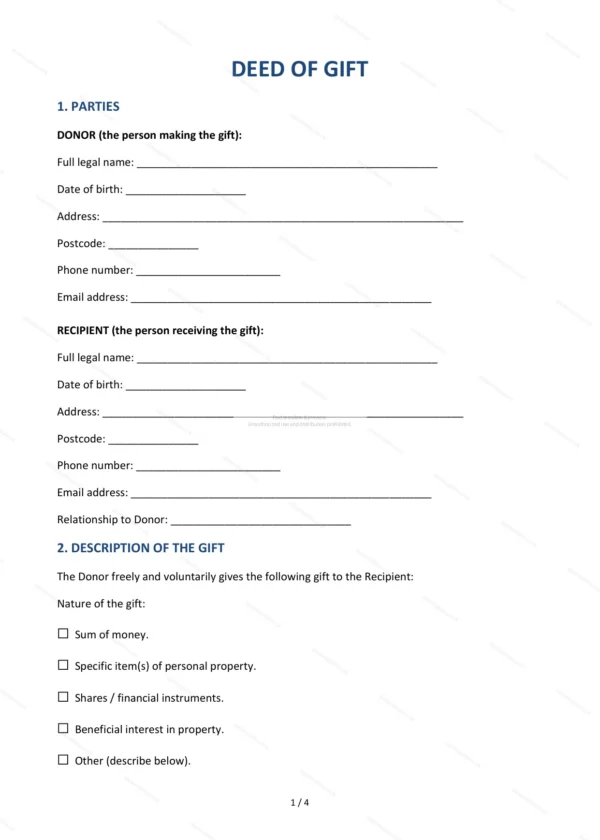
- Parties — identifies the donor and the recipient.
- Description of the Gift — describes the money or property being given.
- Gift of Money — Payment Details (if applicable) — payment method and account details for cash gifts.
- Nature of the Gift — confirms the gift is outright and unconditional.
- Tax Considerations — notes on inheritance tax and lifetime gifts.
- Independent Legal Advice — recommendation to take advice where appropriate.
- Entire Agreement — confirms the deed is the complete record.
- Governing Law — confirms England and Wales law applies.
- Execution — correct signing formalities for a deed.
Easy to customise
The template opens in Microsoft Word, Google Docs and LibreOffice. Simply fill in the highlighted fields, describe the gift, tick the relevant options and edit any clause to suit your circumstances.
Format and scope
Download instantly as an editable Word (.docx) file and a print-ready PDF, formatted to A4. Written in plain British English with light, general references to England and Wales law and inheritance tax considerations.
How to edit the template
- Download the DOCX file after purchase
- Open it in Word, Google Docs, LibreOffice or another DOCX editor
- Fill in the parties' details in the marked fields
- Edit the terms and text to match what has been agreed
- Print it for signing or send it digitally