Holiday Request Form — Annual Leave Request Form Template (Word & PDF)
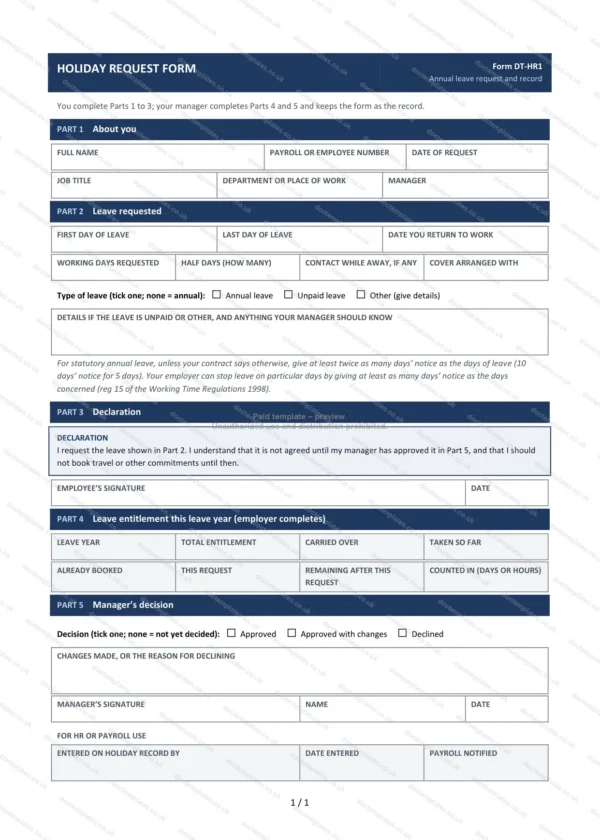
Holiday requests fit on one A4 page. The employee asks for dates, the employer records the remaining entitlement, and the manager approves, amends or declines the request.
Compatible with:
Drafted for England & Wales and checked against current UK legislation. Last reviewed November 2026. How we check


Your card details go straight to Stripe, our payment processor. They are never stored on this site. Checkout takes a minute and needs no account.
Every holiday request comes down to three things: a date, a decision and a record. This annual leave request form fits all three onto one A4 page. The employee asks, the employer records the leave entitlement, the manager decides, and the sheet itself is kept as the record.
Who the form is for
Small and medium employers who want one consistent way to request and approve holidays, and employees asking for annual leave, unpaid leave or other time off.
What the form includes
- Part 1, About you: name, payroll number, date of request, job title, department and manager.
- Part 2, Leave requested: first and last day, return date, working and half days, contact while away, who covers the work, and a tick for annual, unpaid or other leave, with a box for details.
- Notice: how much notice statutory annual leave needs (at least twice the days of leave, unless the contract says otherwise), and when an employer can stop leave on particular days.
- Part 3, Declaration: the employee’s signature, confirming that the leave is not agreed until approved, so no travel should be booked before then.
- Part 4, Entitlement: leave year, total, carried over, taken, booked, this request and remaining.
- Part 5, Manager’s decision: approved, approved with changes or declined, with reasons, and a strip for HR or payroll.
Format
Download instantly as an editable Word (.docx) file and a PDF, both formatted to A4. It opens in Microsoft Word, Google Docs and LibreOffice. Tick boxes can be ticked with a click in Word and LibreOffice, or by hand on paper.
How to edit the template
- Download the DOCX file after purchase
- Open it in Word, Google Docs, LibreOffice or another DOCX editor
- Fill in the parties' details in the marked fields
- Edit the terms and text to match what has been agreed
- Print it for signing or send it digitally