 1 /
2
Section 146 Notice Template — Breach of Lease Covenant (Word & PDF)
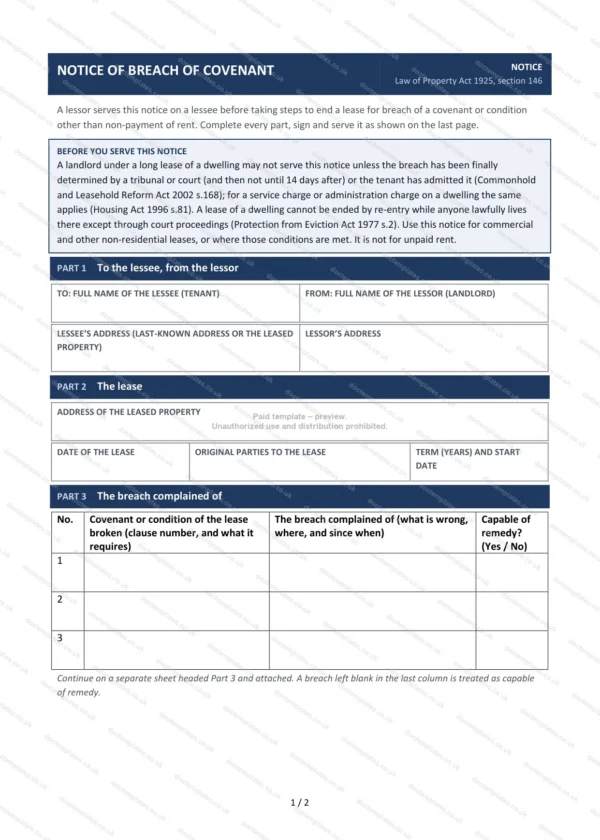
A two-page notice under section 146 of the Law of Property Act 1925, for service on a tenant before forfeiture for breach of a lease covenant. It sets out each breach, the remedy and compensation.
Compatible with:
Drafted for England & Wales and checked against current UK legislation. Last reviewed November 2026. How we check


Your card details go straight to Stripe, our payment processor. They are never stored on this site. Checkout takes a minute and needs no account.
Thinking of ending a lease over a breach that is not unpaid rent? This two-page section 146 notice under the Law of Property Act 1925 sets out each breach before you take steps to end the lease. It requires every breach that can be remedied to be put right, and it requires compensation.
Who is this notice for?
You can use it if you are a landlord or agent with a commercial or other non-residential lease. It also applies to residential long leases, but only where the extra conditions set by law for homes have been met.
What is in the notice?
- Caution: residential long leases, service charges, and the court order needed to re-enter a home.
- Parties and lease: the lessee and lessor details, plus the property, the lease date, the original parties and the term.
- Breaches: a table of every covenant, showing what is wrong and whether it can be remedied.
- What the lessor requires: the steps to remedy, the time allowed (a reasonable time if left blank), and compensation, either a stated sum or a reasonable amount.
- Repairs: the lessee’s right to serve a counter-notice for repair breaches in leases of seven years or more with three years or more left, and the lessor’s address for service.
- Signature and service: signing the notice, serving it in the way the notice explains, and a record of service.
Scope
Not for unpaid rent. Forfeiture is serious, so seek advice before you serve. The lessee may apply to the court for relief.
Format
Download it instantly as an editable Word (.docx) file and a PDF, both formatted to A4. It opens in Microsoft Word, Google Docs and LibreOffice. In Word and LibreOffice, click to tick the boxes; on paper, tick them by hand.
How to edit the template
- Download the DOCX file after purchase
- Open it in Word, Google Docs, LibreOffice or another DOCX editor
- Fill in the parties' details in the marked fields
- Edit the terms and text to match what has been agreed
- Print it for signing or send it digitally