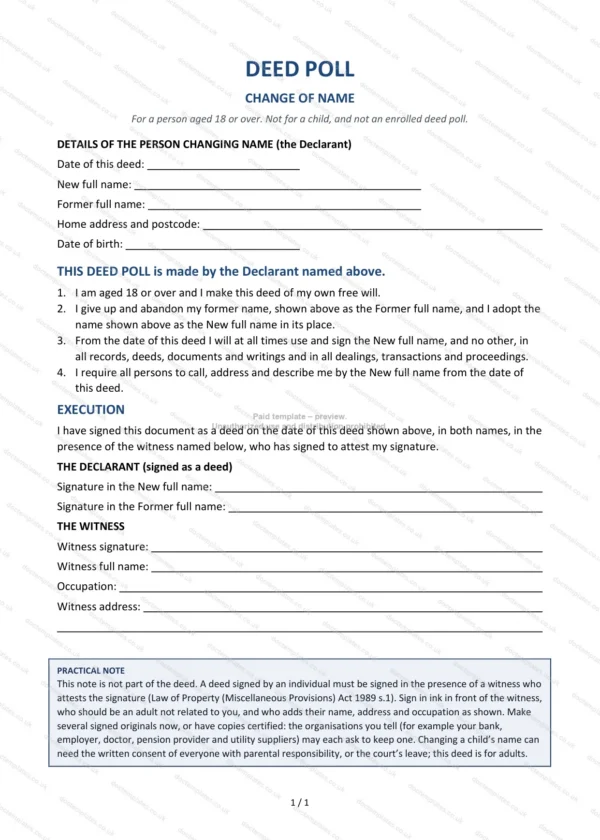
Change of Name Deed Poll Template (Adult, Unenrolled) — Word & PDF
A one-page unenrolled deed poll for an adult who is changing their name in the UK. You sign it in both names before a witness, and it comes with a practical note on copies.
Compatible with:
Drafted for England & Wales and checked against current UK legislation. Last reviewed November 2026. How we check


Your card details go straight to Stripe, our payment processor. They are never stored on this site. Checkout takes a minute and needs no account.
Changing your name as an adult takes one signed deed. This change of name deed poll template is unenrolled: you fill it in, sign it in both your old and new names in front of a witness, and keep it on one A4 page laid out as a formal deed.
Who is this template for?
It is for anyone aged 18 or over who is changing their forename, surname or both, for example after marriage, divorce or a personal choice.
What does the deed poll include?
- Details: the date of the deed, your new full name, your former full name, home address and date of birth.
- Declarations: these confirm that you make the deed of your own free will, give up the former name and adopt the new one, use the new name at all times, and ask everyone to use it.
- Execution: your signatures in the new and former names, attested by a witness, whose name, occupation and address are also included.
- Practical note: this does not form part of the deed. It covers signing in ink, choosing an adult witness who is not related to you, and making several signed originals or certified copies, because each organisation you tell may ask to keep one.
Scope
For adults only. It is not for changing a child’s name, and it is not an enrolled deed poll.
Format
Download it instantly as an editable Word (.docx) file and a PDF, formatted to A4. It opens in Microsoft Word, Google Docs and LibreOffice.
How to edit the template
- Download the DOCX file after purchase
- Open it in Word, Google Docs, LibreOffice or another DOCX editor
- Fill in the parties' details in the marked fields
- Edit the terms and text to match what has been agreed
- Print it for signing or send it digitally