 1 /
3
1 /
3
IP Assignment Agreement — Word & PDF Template
An intellectual property assignment agreement transferring ownership of IP from one party to another, with warranties, moral rights and further assurance clauses.
incl. VAT
Compatible with:
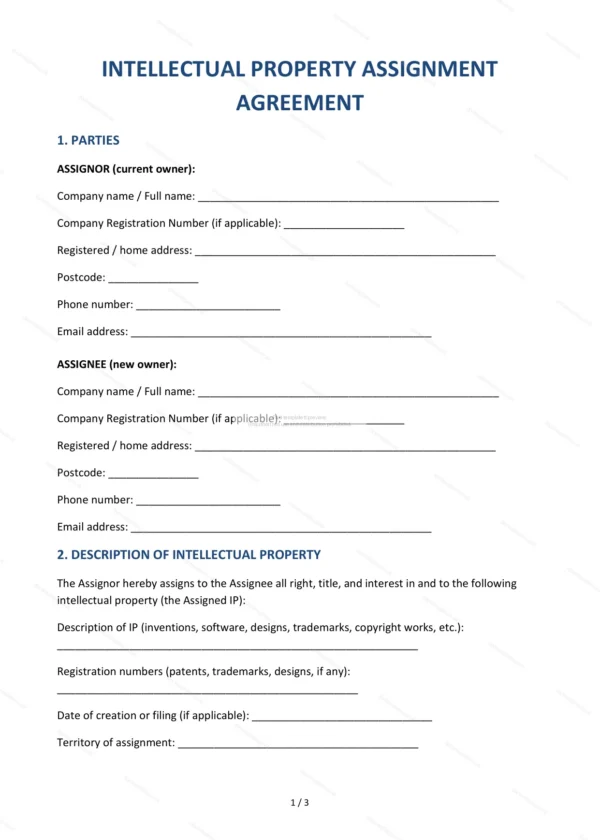
This IP assignment agreement template transfers ownership of intellectual property — such as copyright, designs, software or trade marks — from one party to another. It covers a clear description of the IP, consideration, warranties, moral rights and further assurance, giving businesses and individuals in England and Wales a clean transfer of rights.
Who is this template for?
It suits businesses acquiring IP from contractors, freelancers or employees, founders consolidating IP into a company, buyers and sellers of creative or technical works, and anyone who needs to secure full ownership of intellectual property.
What does the template include?
The agreement is organised into clear, ready-to-complete clauses:
- Parties — identifies the assignor and the assignee.
- Description of Intellectual Property — the IP being assigned.
- Consideration — any payment for the assignment.
- Warranties — the assignor’s assurances about the IP.
- Moral Rights — treatment of moral rights.
- Further Assurance — duty to sign further documents to perfect the transfer.
- Confidentiality — protection of confidential information.
- Governing Law — confirms England and Wales law applies.
- Entire Agreement — confirms the document is the complete record.
- Signatures — signing block for both parties.
Easy to customise
The template opens in Microsoft Word, Google Docs and LibreOffice. Fill in the highlighted fields, describe the IP and consideration, tick the relevant options and edit any clause to suit your transfer.
Format and scope
Download instantly as an editable Word (.docx) file and a print-ready PDF, formatted to A4. Written in plain British English with light, general references to England and Wales intellectual property law.
How to edit the template
- Download the DOCX file after purchase
- Open it in Word, Google Docs, LibreOffice or another DOCX editor
- Fill in the parties' details in the marked fields
- Edit the terms and text to match what has been agreed
- Print it for signing or send it digitally