 1 /
4
1 /
4
Transfer of Equity — Word & PDF Template
A UK transfer of equity for changing the legal owners of a property, covering the nature of the transfer, consideration, existing mortgage and legal formalities.
incl. VAT
Compatible with:
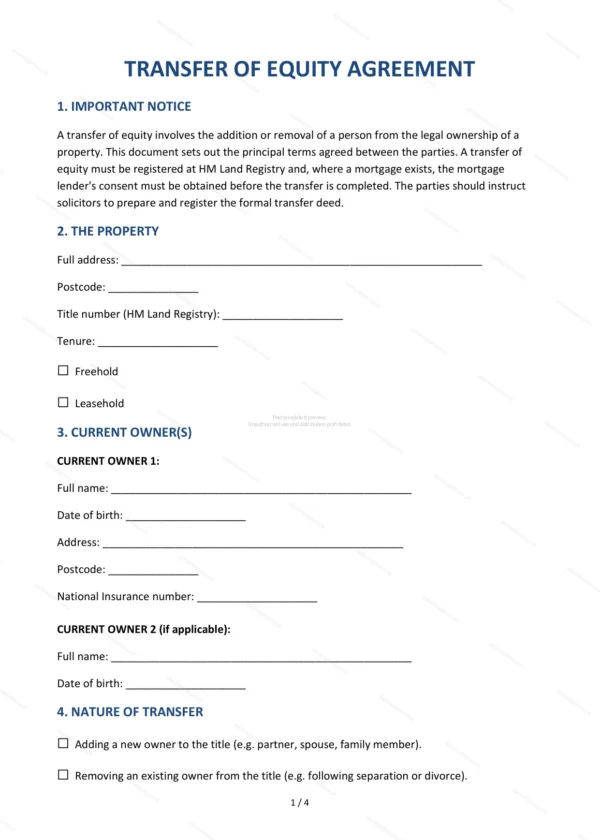
This Transfer of Equity document records a change in the legal ownership of a property, such as adding or removing an owner. It covers the nature of the transfer, any consideration, the existing mortgage and the legal formalities, making it ideal for couples, families and co-owners in England and Wales.
Who is this template for?
It is designed for property owners changing who is on the title, for example adding a partner, removing a former partner or transferring a share to a family member. It is often used following marriage, separation or a gift of a share in a home.
What does the template include?
The document is fully structured and covers the key elements of a transfer of equity:
- Important Notice — guidance on registration and advice.
- The Property — the property affected.
- Current Owner(s) — the existing legal owners.
- Nature of Transfer — what change is being made.
- Incoming Owner (if adding) — any new owner being added.
- Consideration — any money paid for the transfer.
- Existing Mortgage — treatment of any mortgage.
- Deed of Trust (if applicable) — declaring beneficial shares.
- Legal Formalities — Land Registry and deed requirements.
- Governing Law — England and Wales jurisdiction.
- Signatures — execution by the parties.
Easy to customise
The template works in Microsoft Word, Google Docs and LibreOffice. Simply fill in the highlighted fields, tick the relevant checkboxes and edit any clauses to suit your arrangement. No special software is required.
Format and scope
The document downloads as an editable Word (.docx) file and a ready-to-print PDF, formatted to A4. It is drafted for use in England and Wales with light, general legal references.
How to edit the template
- Download the DOCX file after purchase
- Open it in Word, Google Docs, LibreOffice or another DOCX editor
- Fill in the parties' details in the marked fields
- Edit the terms and text to match what has been agreed
- Print it for signing or send it digitally