 1 /
4
1 /
4
Codicil to a Will — Word & PDF Template
A codicil to make one or a few small changes to an existing will, such as adding or revoking a gift or replacing an executor or guardian, with signing and witnessing blocks.
Compatible with:


Your card details go straight to Stripe, our payment processor. They are never stored on this site. Checkout takes a minute and needs no account.
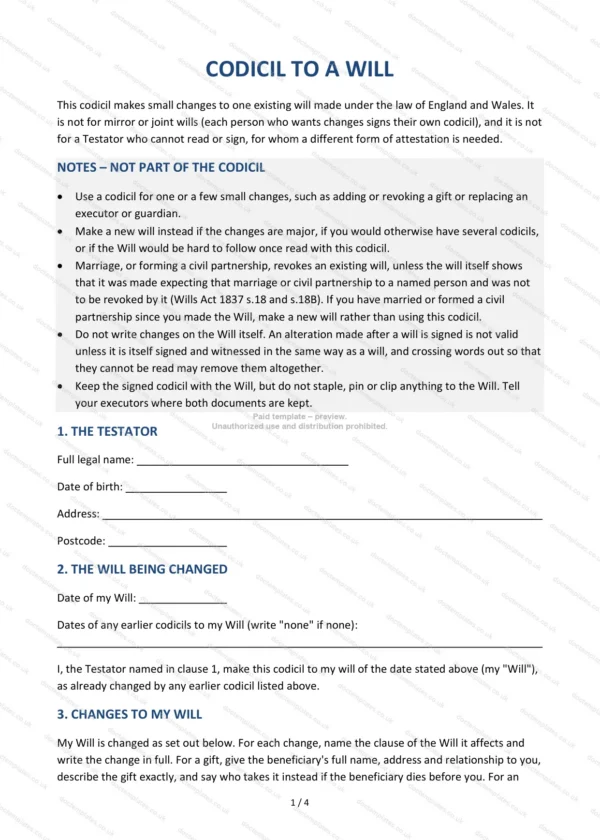
This codicil template makes small changes to one existing will made under the law of England and Wales. It identifies the will and any earlier codicils, sets out each change in full, confirms the rest of the will and provides for signing in front of two witnesses.
Who is this template for?
It suits a person who wants to add or revoke a gift, or replace an executor or guardian, without rewriting their whole will. As the document itself states, it is not for mirror or joint wills (each person who wants changes signs their own codicil), and it is not for a testator who cannot read or sign. Its guidance notes suggest making a new will instead where the changes are major or the testator has married or formed a civil partnership since making the will.
What does the template include?
The codicil opens with a guidance box of notes that is not part of the codicil, followed by numbered sections:
- The Testator — full legal name, date of birth and address.
- The Will Being Changed — the date of the will and of any earlier codicils.
- Changes to My Will — up to four changes, each with tick boxes to label it (revoke a gift, add a gift, executor, guardian of children or other), the clause affected and the change written in full.
- Confirmation of the Rest of My Will — the will and codicils are read together, with this codicil prevailing where they conflict.
- Signing and Witnessing — how the codicil must be signed and witnessed, guidance on choosing witnesses, and signature blocks for the testator and two witnesses.
Easy to customise
The template opens in Microsoft Word, Google Docs and LibreOffice. Fill in the highlighted fields, write out each change in full, tick the label for each change and strike through any change you do not use.
Format and scope
Download instantly as an editable Word (.docx) file and a PDF, formatted to A4. Written in plain British English and drafted for use in England and Wales.
How to edit the template
- Download the DOCX file after purchase
- Open it in Word, Google Docs, LibreOffice or another DOCX editor
- Fill in the parties' details in the marked fields
- Edit the terms and text to match what has been agreed
- Print it for signing or send it digitally