 1 /
5
1 /
5
Freelance Services Agreement — Word & PDF Template
A freelance services agreement covering services, fees, expenses, VAT, contractor status, IP, confidentiality and termination between a freelancer and a client.
incl. VAT
Compatible with:
This freelance services agreement template sets out the terms between a freelancer and a client for project or ongoing work. It covers the services, fees, expenses and VAT, independent contractor status, intellectual property, confidentiality and termination, giving freelancers and clients in England and Wales a clear, professional contract.
Who is this template for?
It suits freelancers and self-employed professionals, designers, writers, developers and consultants, and clients engaging freelance help who want clear terms on deliverables, payment and ownership of work.
What does the template include?
The agreement is organised into clear, ready-to-complete clauses:
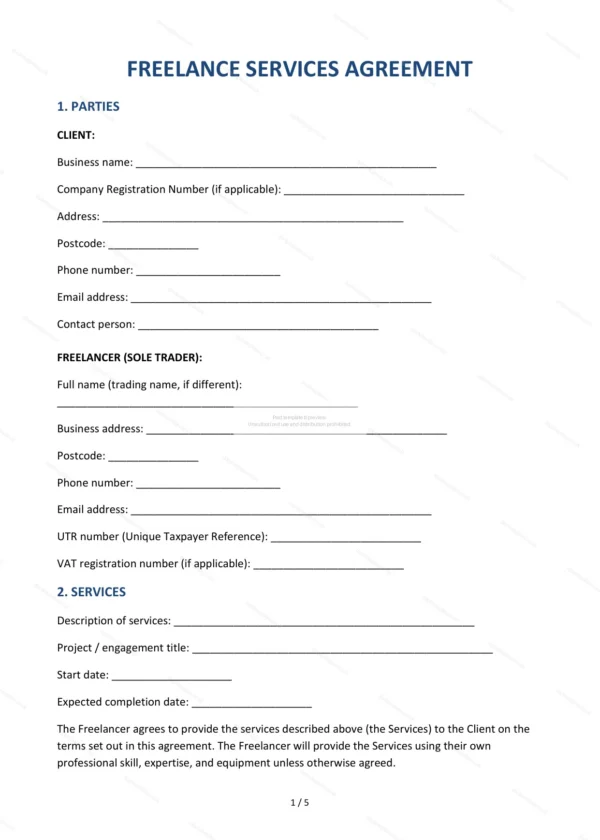
- Parties — identifies the freelancer and the client.
- Services — the work to be carried out.
- Fees and Payment — fee structure, expenses and VAT.
- Independent Contractor Status — confirms the freelancer is self-employed.
- Intellectual Property — ownership and licensing of work created.
- Confidentiality — protection of confidential information.
- Warranties — assurances about the services.
- Liability — limits on liability.
- Term and Termination — duration and how the agreement ends.
- Governing Law and Jurisdiction — confirms England and Wales law applies.
- Entire Agreement — confirms the document is the complete record.
- Signatures — signing block for both parties.
Easy to customise
The template opens in Microsoft Word, Google Docs and LibreOffice. Fill in the highlighted fields, set the fees, expenses and IP terms, tick the relevant options and edit any clause to suit your project.
Format and scope
Download instantly as an editable Word (.docx) file and a print-ready PDF, formatted to A4. Written in plain British English with light, general references to England and Wales commercial law.
How to edit the template
- Download the DOCX file after purchase
- Open it in Word, Google Docs, LibreOffice or another DOCX editor
- Fill in the parties' details in the marked fields
- Edit the terms and text to match what has been agreed
- Print it for signing or send it digitally