 1 /
4
1 /
4
Licence to Occupy — Word & PDF Template
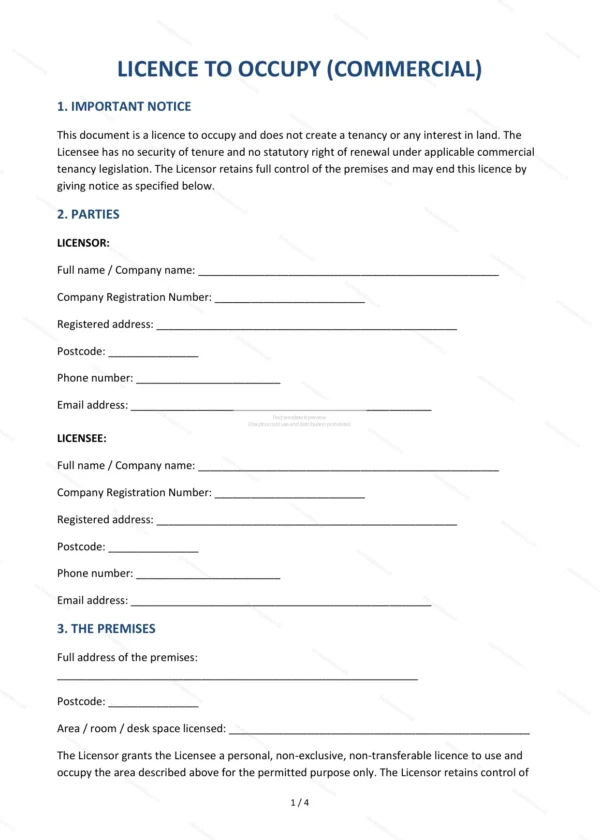
Licence to occupy granting non-exclusive, short-term use of premises without creating a tenancy, covering the permitted purpose, licence fee, obligations and termination.
incl. VAT
Compatible with:
This Licence to Occupy grants a licensee the right to use premises for an agreed purpose without creating a tenancy or exclusive possession. It is designed for flexible, short-term occupation arrangements in England and Wales.
Who is this template for?
Useful for owners and occupiers of offices, workspaces, units and other premises who want a flexible arrangement that falls short of a lease, such as serviced space, pop-ups, temporary use or shared facilities.
What does the template include?
The licence is organised into clear sections:
- Important Notice — explanation of how a licence differs from a tenancy.
- Parties — the licensor and licensee.
- The Premises — the space being made available.
- Permitted Purpose — what the premises may be used for.
- Licence Period — the duration of the arrangement.
- Licence Fee — the payment due for occupation.
- Licensee’s Obligations — the occupier’s responsibilities.
- Licensor’s Obligations — the owner’s responsibilities.
- Termination — how the licence can be ended.
- Insurance and Liability — cover and risk allocation.
- Governing Law — England & Wales jurisdiction.
- Signatures — execution by the parties.
Easy to customise
The template works in Microsoft Word, Google Docs and LibreOffice. Fill in the highlighted fields, choose the relevant options and adjust the clauses before signing.
Format and scope
Provided as an editable Word (.docx) file and a ready-to-print PDF in A4 size, drafted for use in England and Wales.
How to edit the template
- Download the DOCX file after purchase
- Open it in Word, Google Docs, LibreOffice or another DOCX editor
- Fill in the parties' details in the marked fields
- Edit the terms and text to match what has been agreed
- Print it for signing or send it digitally