 1 /
5
1 /
5
HMO Room Rental Agreement — Word & PDF Template
An HMO room rental agreement for letting a single room in a house in multiple occupation, with licensing, rent, deposit, house rules and notice clauses.
incl. VAT
Compatible with:
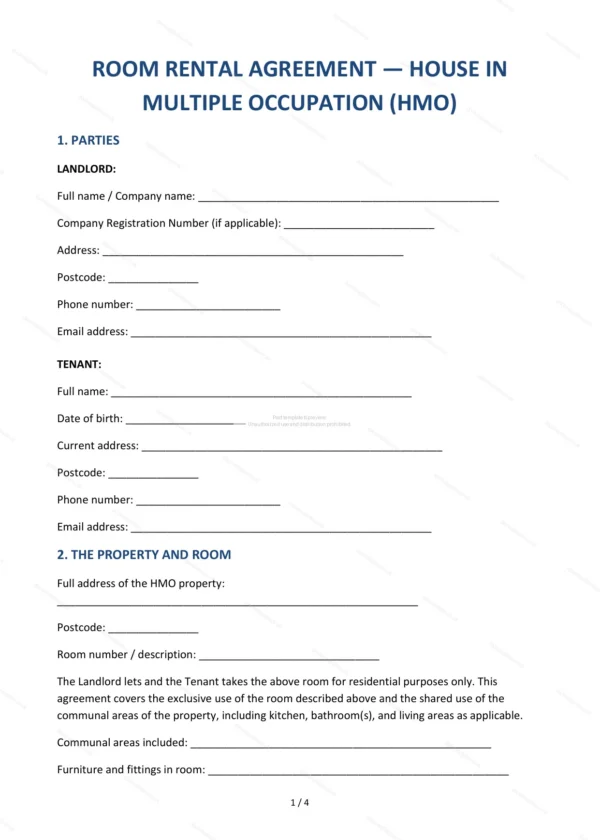
This HMO room rental agreement template is for letting a single room in a house in multiple occupation, with shared use of common areas. It covers HMO licensing, rent, deposit, landlord and tenant obligations, house rules and notice, giving landlords in England and Wales a clear contract for room-by-room letting.
Who is this template for?
It suits landlords letting individual rooms in shared houses, HMO operators and managing agents, and house-share arrangements where each occupier has their own room and shares kitchen and bathroom facilities.
What does the template include?
The agreement is organised into clear, ready-to-complete clauses:
- Parties — identifies the landlord and the tenant.
- The Property and Room — the property, the room and shared areas.
- HMO Licensing — confirmation of any required HMO licence.
- Tenancy Term — the length of the tenancy.
- Rent — the rent and how it is paid.
- Deposit — the deposit and protection arrangements.
- Landlord Obligations — the landlord’s responsibilities.
- Tenant Obligations — the tenant’s responsibilities.
- House Rules — rules for the shared household.
- Termination and Notice — how the tenancy ends and notice required.
- Governing Law — confirms England and Wales law applies.
- Signatures — signing block for both parties.
Easy to customise
The template opens in Microsoft Word, Google Docs and LibreOffice. Fill in the highlighted fields, set the rent, deposit and house rules, tick the relevant options and edit any clause to suit the property.
Format and scope
Download instantly as an editable Word (.docx) file and a print-ready PDF, formatted to A4. Written in plain British English with light, general references to England and Wales housing law and HMO licensing.
How to edit the template
- Download the DOCX file after purchase
- Open it in Word, Google Docs, LibreOffice or another DOCX editor
- Fill in the parties' details in the marked fields
- Edit the terms and text to match what has been agreed
- Print it for signing or send it digitally