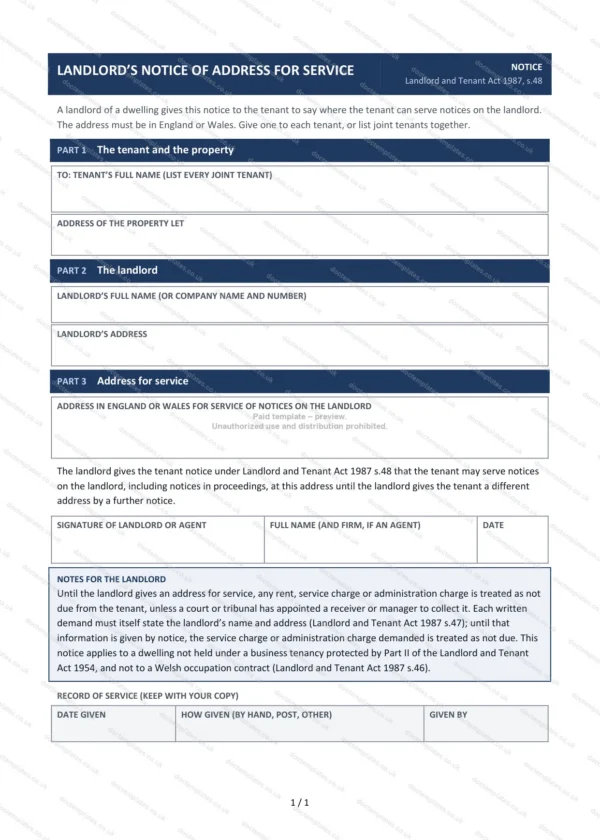
Section 48 Notice Template UK — Landlord’s Notice of Address for Service (Word & PDF)
A one-page notice under section 48 of the Landlord and Tenant Act 1987, giving a tenant an address in England or Wales for serving notices on the landlord.
Compatible with:
Drafted for England & Wales and checked against current UK legislation. Last reviewed November 2026. How we check


Your card details go straight to Stripe, our payment processor. They are never stored on this site. Checkout takes a minute and needs no account.
Use this one-page section 48 notice under the Landlord and Tenant Act 1987 to give your tenant an address in England or Wales where they can serve notices on you. It fits on one A4 page.
Who needs this notice?
This notice is for landlords of residential property, including flats, and their letting or managing agents. They must give each tenant an address for service.
What the notice covers
- Tenant and property: every joint tenant, and the address that was let.
- Landlord: name (or company name and number), plus address.
- Address for service: an address in England or Wales, the wording of the notice, and the landlord’s or agent’s signature with the date.
- Notes for the landlord: why the address matters, including the effect on rent and charges until one is given, and how demands must show the landlord’s name and address.
- Record of service: the date, the method and who gave it.
Scope
It covers residential dwellings, with the address in England or Wales. It does not cover business tenancies protected by the Landlord and Tenant Act 1954, or Welsh occupation contracts.
Format
Instant download as an editable Word (.docx) file and a PDF, both formatted to A4. The files open in Microsoft Word, Google Docs and LibreOffice. Tick the boxes with a click in Word and LibreOffice, or by hand on paper.
How to edit the template
- Download the DOCX file after purchase
- Open it in Word, Google Docs, LibreOffice or another DOCX editor
- Fill in the parties' details in the marked fields
- Edit the terms and text to match what has been agreed
- Print it for signing or send it digitally