 1 /
4
1 /
4
Commercial Lease (Office) — Word & PDF Template
Office commercial lease covering rent, service charge, deposit, tenant and landlord obligations and break clause for letting office space in England & Wales.
incl. VAT
Compatible with:
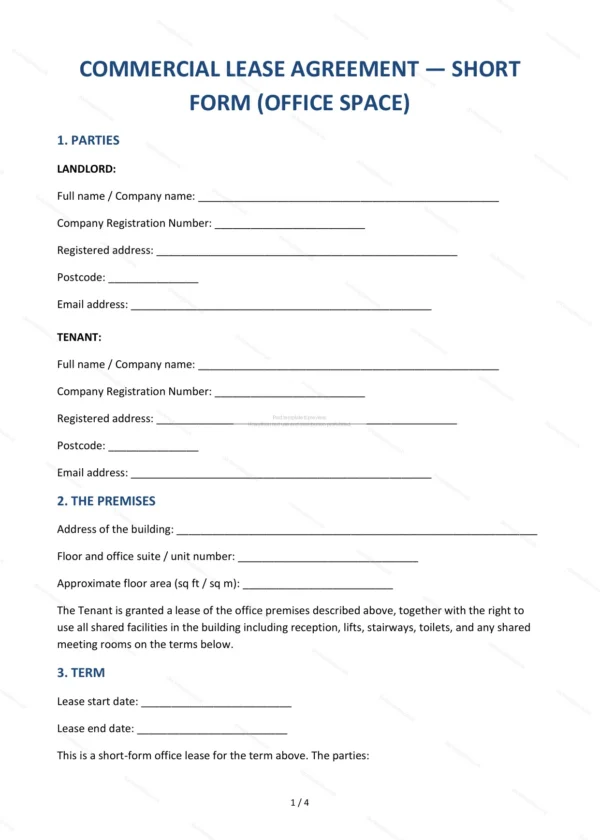
This office commercial lease sets out the terms on which office premises are let to a business tenant. It is a straightforward lease covering rent, service charge and the responsibilities of landlord and tenant for a typical office letting.
Who is this template for?
It suits landlords letting office space and businesses taking an office in England and Wales. Use it for serviced or self-contained office lettings where a clear but simpler lease is needed.
What does the template include?
The lease is organised into clearly numbered clauses covering the letting:
- Parties — identifies the landlord and the tenant.
- The premises — the office let.
- Term — length of the lease.
- Rent and service charge — rent and contribution to costs.
- Deposit — security deposit.
- Tenant’s obligations — duties of the tenant.
- Landlord’s obligations — duties of the landlord.
- Utilities — responsibility for utilities.
- Break clause — ending the lease early.
- Governing law — England and Wales jurisdiction.
- Signatures — execution by both parties.
Easy to customise
The template works in Microsoft Word, Google Docs and LibreOffice. Fill in the highlighted fields, set the rent and term and remove anything that does not apply.
Format and scope
Supplied as an editable Word (.docx) file and a ready-to-print PDF, formatted to A4. Written in plain British English with light, general references to England & Wales commercial property law.
How to edit the template
- Download the DOCX file after purchase
- Open it in Word, Google Docs, LibreOffice or another DOCX editor
- Fill in the parties' details in the marked fields
- Edit the terms and text to match what has been agreed
- Print it for signing or send it digitally